
The box where everything happens.
Almost every conversation about AI infrastructure happens a high level: people argue about gigawatts, rack density, and grid interconnects, often skipping the machine that all the rest exists to serve.
The AI server is the single smallest individual working unit. A cluster is a few thousand of them wired together. A data center is a building that keeps them cool and powered.
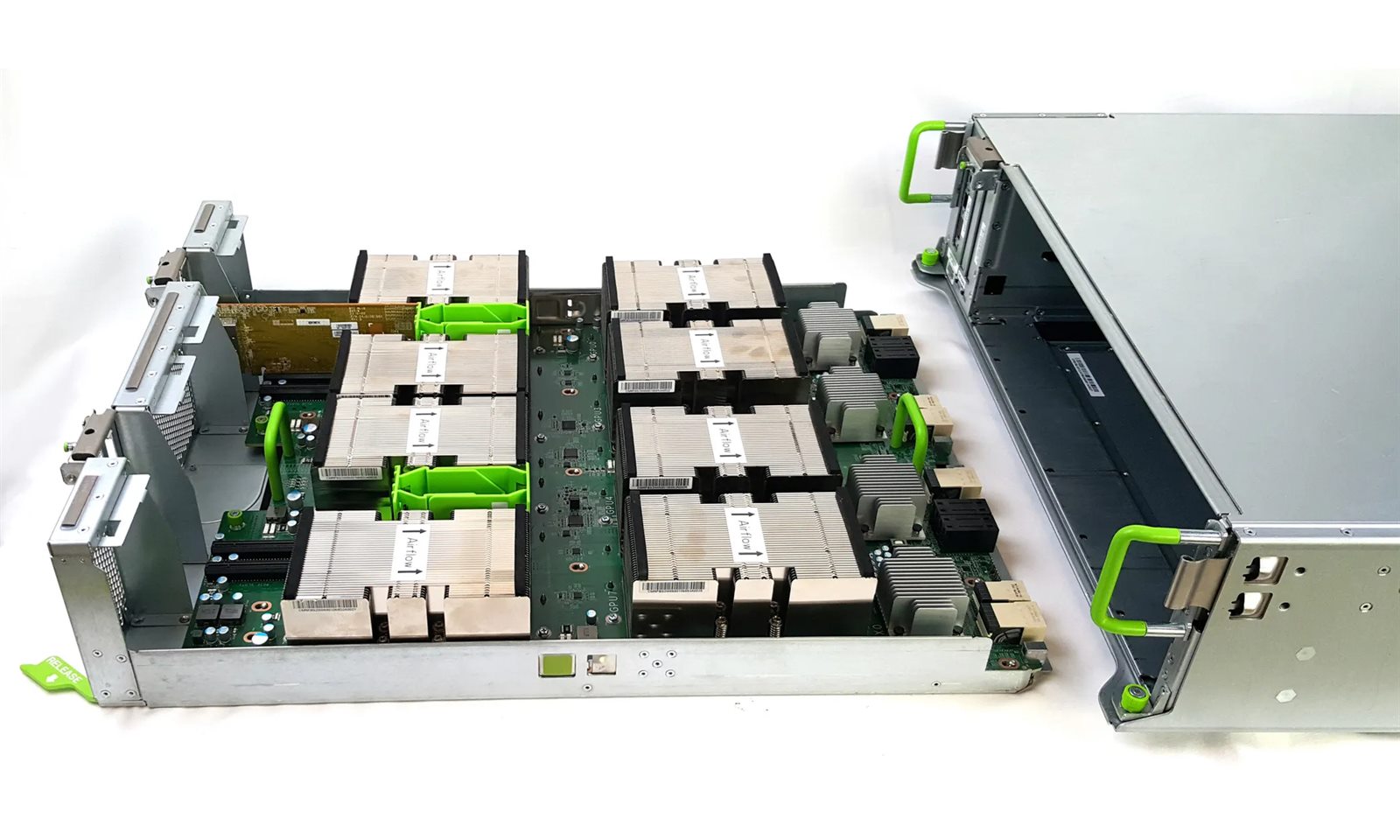
So: what is an AI server, what’s actually in it, which numbers on the spec sheet matter, and who builds them.
An AI server is not a server with a GPU in it
A general-purpose server is built around its CPUs. Everything else like memory, I/O, storage hangs off them. An AI server inverts that. The accelerators (GPUs!) are the important machines. The CPUs, DRAM, NVMe, and NICs exist for one purpose: keeping eight very expensive chips working. The GPUs are roughly 60–70% of the bill of materials of a server. Most design decisions are focused on maximizing their performance.
Four things define the a server:
Size. Typically fitting a standard 19” rack, these machines come in different heights (standardized in “U”s — like 2U or 4U) for a typical depth of roughly 35”.
Accelerator density. The number of GPUs in a certain sized system. For example, a typical air-cooled 4U server with RTX Pro 6000 accelerators use up to 8 GPUs.
A host subsystem sized to feed, not to compute. One or two CPUs, 24–32 DDR5 slots, local NVMe, and a lot of network interfaces.
An internal GPU fabric. NVLink with NVSwitch, or AMD’s Infinity Fabric. This is what lets eight discrete chips behave like one large accelerator, each sharing comms and memory.
Power and thermals. A redundant PSU system, such as 2 + 2 (i.e. 2 PSU to power the entire system, but another pair within the same server for redundancy) or 4 + 4, for PSU with individual power draw of roughly 3 kW.
Regarding the GPU interconnection, within the single server, there are two broad families, and the distinction matters:
- SXM or OAM baseboard. Eight GPUs soldered onto a shared board like NVIDIA HGX B200, HGX H200, AMD MI355X on an OAM universal baseboard. Full-bandwidth GPU-to-GPU links. This is the what leads to a training machine or a high-end inference machine. 4U to 10U.
- PCIe connected. A standard slots for multiple different types of cards and other components, including RTX PRO 6000 Blackwell, L40S, single-wide 75W accelerators. Cheaper, more flexible, easier to deploy. However also with a slower connection between GPUs.
What’s inside the box
The GPUs. These are purpose built chips, inherited from graphics rendering, that are hardware optimized to run matrix multiplications (the operations that LLM models and other AI workloads run) in parallel.
The baseboard for GPUs. SXM GPUs mount onto a dedicated baseboard with high-speed traces running between every GPU. NVIDIA’s is HGX (eight GPUs plus NVSwitch chips); AMD’s open equivalent is the OAM module on a UBB. When a spec sheet says “HGX B200 8-GPU,” it means one board, eight chips, one tightly-coupled accelerator.
The interconnect between GPUs. For SXM baseboards, NVIDIA’s NVLink such as the NVLink 4 on Hopper moves 900 GB/s per GPU. NVLink 5 on Blackwell doubles it to 1.8 TB/s per GPU, 14.4 TB/s aggregate across an eight-GPU HGX B200 board. AMD presents the Infinity Fabric with the 4th-gen that links seven MI355X at up to 153 GB/s each. On the other hand, the PCIe bus PCIe Gen5 x16 gives you 64 GB/s. That’s an order of magnitude gap, and it’s the entire reason baseboard nodes exist.
Host CPUs. Dual Intel Xeon (Emerald Rapids, Xeon 6) or AMD EPYC (9004/9005). They load data, schedule work, run the OS. Core counts are high, Dell’s XE7745 ships dual 5th-gen EPYC 9005 with up to 192 cores per socket, but the CPU is a feeder, not a performer. Undersize it and you starve the pipeline; oversize it and you’ve bought cores that idle.
System memory. The server’s main RAM — this is the CPU’s memory, separate from the HBM stacked on the GPUs themselves. It comes as sticks called DDR5 RDIMMs (DDR5 is the current generation; the “R” is for registered, a design that adds a buffer chip so a server can run far more sticks reliably than a desktop could). There are 24–32 slots to plug them into, holding 1.5–4 TB all together, running at 5600–6400 MT/s (megatransfers per second — roughly, how many times a second the memory can hand over data; higher means faster). The rough sizing rule: give the host 1–2× as much RAM as the total HBM across all the GPUs, so that staging the next batch of data and writing out checkpoints have somewhere roomy to land and don’t become the bottleneck that leaves the GPUs waiting.
Networking. Each GPU gets its own network card (NIC), the part that plugs the server into the network, so it has a full-speed path to GPUs in other servers instead of fighting over a shared one. Eight GPUs, eight NICs (that’s the “1:1” you’ll see on spec sheets). These are usually ConnectX-7s (400 gigabits per second) or the newer ConnectX-8s (double that, 800G), both made by NVIDIA. Swap in BlueField-3 DPUs, NICs with a small processor of their own — where you want the card to handle networking and storage chores itself instead of burdening the host CPU; that’s what “offload” means. Separate from all this, a second set of interfaces handles the less demanding traffic, reaching storage and talking to the outside world, usually tucked into a dedicated slot (OCP 3.0 or AIOM) so it doesn’t cost you a GPU slot. The fabric tying the servers together is either InfiniBand (400G or 800G) or ordinary Ethernet running RoCEv2, which lets machines swap data while mostly leaving each other’s CPUs out of it.
Storage. Fast local drives (NVMe — flash storage that plugs straight into the high-speed PCIe bus rather than sitting behind a slower disk controller) in one of a couple of physical shapes: 2.5" U.2/U.3, the drive-bay format that looks like a chunky laptop disk, or EDSFF E3.S, a newer ruler-shaped format built for dense server racks. These handle three jobs — staging the dataset (parking the next batch of training data close to the GPUs), scratch (temporary working space), and checkpointing (periodically saving the half-trained model so a crash doesn’t cost you days of work). Alongside them sits a separate, smaller boot drive that holds the operating system, mirrored — two drives kept as identical copies so the server survives one of them dying (Dell’s version is called BOSS; it’s usually a pair of M.2 sticks, the little gumstick-sized drives). Why keep all this local instead of on the network? Because both checkpointing and streaming training data need enormous, sustained bandwidth, and buying that much speed over the network is far more expensive than putting the drives right in the box. GPUDirect Storage is the finishing touch: it lets those NVMe drives feed data straight into the GPU without first detouring through the CPU (a “CPU bounce”), removing a middleman that would otherwise slow the handoff.
Power. Titanium-grade PSUs in redundant configurations: 4× 3000W (2+2) on the HGX A100 generation, 4× 6600W on liquid-cooled B200, 6× 5250W (3+3) on the big air-cooled boxes. Full systems pull 10 kW and up.
Cooling. Air works to roughly 700W per GPU with heavy-duty counter-rotating fans. Above about 1,000W per GPU — Blackwell and MI355X at full clocks — direct liquid cooling stops being a preference and becomes a requirement.
Management. A separate little controller called a BMC (baseboard management controller) that lets you run the server remotely, power it on, check its health, reinstall it (even when the main system is off or crashed!!). It talks over two standard protocols, IPMI 2.0 (the older one) and Redfish (the modern replacement), and every vendor ships their own branded version: Dell’s is iDRAC, HPE’s is iLO, Lenovo’s is XCC, and Supermicro has its own. Bundled in is a set of security features that make sure the machine only ever runs software it’s supposed to: a silicon root of trust (a tamper-proof anchor baked into the hardware that every later check traces back to), TPM 2.0 (a dedicated chip that safely stores encryption keys and identity), signed firmware (low-level code cryptographically stamped to prove it hasn’t been tampered with), and secure boot (which refuses to start anything that fails those checks).
Two examples
Put a previous-generation training node next to a current-generation inference node and the divergence is obvious.
Supermicro AS-4124GO-NART+: 4U, Dual EPYC 7002/7003 on Socket SP3. Eight SXM A100s (40GB HBM2 or 80GB HBM2e) on an HGX board with NVLink 3.0 and NVSwitch. 32 DIMM slots, up to 8TB DDR4-3200. NICs at a 1:1 GPU ratio for GPUDirect RDMA. Eight PCIe 4.0 x16 slots behind a PCIe switch. Six hot-swap NVMe bays, ten with the rear option. Four 3000W (2+2) Titanium PSUs. 225 lbs gross.
Dell PowerEdge XE7745: also 4U, also air-cooled, entirely different intent. Dual 5th-gen EPYC 9005. 24 DDR5 slots to 3TB at 6400 MT/s. Then the interesting part: either eight double-wide 600W PCIe Gen5 accelerators (NVIDIA RTX PRO 6000 Blackwell Server Edition, 96GB GDDR7) or sixteen single-wide 75W cards. Eight additional front-serviceable PCIe slots for backend networking. OCP 3.0 module. Up to eight EDSFF E3.S Gen5 NVMe drives, 122.88 TB. 3200W Titanium PSUs.
Same rack footprint. One is a monolithic training block; the other is a configurable inference platform you can tune from eight big GPUs down to sixteen small ones depending on whether you’re optimizing for model size or request density.
Representative systems
| Server | Form factor | CPUs | GPUs / interconnect | System memory | Networking | Power | Cooling |
|---|---|---|---|---|---|---|---|
| Supermicro SYS-421GE-NBRT-LCC | 4U | 2× Intel Xeon | 8× HGX B200 180GB, NVLink 5 + NVSwitch | 32 DIMM, to 8TB DDR5-5600 | 8× 400G CX-7 (1:1) | 4× 6600W (2+2) | Liquid |
| Supermicro AS-A126GS-TNBR | 10U | 2× EPYC 9005/9004 | 8× HGX B200 180GB, NVLink 5 | 24 DIMM, to 6TB DDR5-6400 | 8× 400G OSFP (1:1) | 6× 5250W (3+3) | Air |
| Dell PowerEdge XE9680 | 6U | 2× Intel Xeon 5th Gen | 8× HGX H100/H200, MI300X, or Gaudi3 | 32 DIMM, to 4TB DDR5 | OCP 3.0 + PCIe Gen5 | 6× PSU (3+3) | Air |
| Dell PowerEdge XE9685L | 4U | 2× EPYC 9005 | 8× HGX B200 180GB, NVLink 5 | 24 DIMM, to 3TB DDR5 | To 12× PCIe Gen5 x16 | 3000W Titanium | Liquid |
| Dell PowerEdge XE7745 | 4U | 2× EPYC 9005 | 8× RTX PRO 6000 (600W) or 16× 75W | 24 DIMM, to 3TB DDR5-6400 | OCP 3.0 + 8 PCIe | 3200W Titanium | Air |
| HPE ProLiant XD685 | 5U liquid / 6U air | 2× EPYC 9005 | 8× B200 / B300 / H200 / MI355X | 24 DIMM DDR5-6400 | Fabric-flexible | Redundant | Air or DLC |
| Lenovo ThinkSystem SR685a V3 | 8U | 2× EPYC 9004/9005 | 8× H100/H200 or MI300X | 24 DIMM | 8× PCIe Gen5, GPUDirect | Redundant | Air |
| NVIDIA DGX B200 | 10U | 2× Xeon Platinum | 8× B200 180GB, NVLink 5 | To 4TB | 8× CX-7 400G + 2× BF-3 | 6× 3.3kW (~14.3 kW peak) | Air |
Configurations vary by SKU (stock-keeping unit, the specific product code for one exact configuration).
Important metrics
HBM capacity per GPU. This determines what model fits. A 180GB B200 holds far larger models — and far more KV cache — than an 80GB H100. Eight of them pool roughly 1.4 TB. When a model plus its cache doesn’t fit, you share across more GPUs and communication overhead starts eating your throughput.
Memory bandwidth. For inference, this is the binding constraint, not compute. Token generation is a matrix-vector operation with arithmetic intensity near 1 FLOP per byte, so it is memory-bound by construction. That’s why the H200 (4.8 TB/s) outruns the H100 (3.35 TB/s) — TB/s are memory speeds — on inference despite comparable compute, and why the jump to ~8 TB/s on Blackwell and MI355X is the headline change.
Interconnect bandwidth, and the ratio between tiers. Intra-node NVLink at 1.8 TB/s per GPU versus inter-node networking at 400–800 Gb/s per NIC. The internal fabric is roughly 18–36× faster than the external one.
FLOPS by precision. FLOPS is just the raw speed number: how many math operations per second the chip can do (the multiply-and-adds that AI models are built on). But two footnotes quietly inflate it. First, headline figures almost always assume structured sparsity, a trick where the chip skips over zeros in the data, which on paper doubles the throughput versus running every number honestly (the “dense” figure); NVIDIA’s own B200 sheet lists node totals “with sparsity” at 2× dense. Second, precision: chips run faster when they use fewer bits to represent each number, so an FP4 figure (4-bit, the coarsest common format) will always look bigger than an 8- or 16-bit one, but it only counts if your workload runs at 4-bit.
Players involved
Chip and baseboard designers: NVIDIA and AMD. They design the accelerator and the reference baseboard. Interestingly, the silicon comes off the same TSMC lines.
First-party systems — NVIDIA DGX. NVIDIA sells DGX B200/B300 as a turnkey appliance. It’s the reference design everyone else builds around.
OEMs — Dell, HPE, Lenovo, Supermicro. They engineer the enclosure, thermals, power delivery, and firmware around the baseboard, validate the whole system, and attach a warranty and a support number. Dell is the enterprise default. Supermicro competes on speed-to-market and price. HPE brings HPC lineage. Lenovo brings global support reach. Gigabyte, ASUS, and Cisco play here too. In Q4 2024 Dell and Supermicro led the branded pack at 7.2% and 6.5% of server revenue, with HPE, IEIT Systems, and Lenovo between 4.9% and 5.5%.
ODMs — Quanta/QCT, Wiwynn, Foxconn, Inventec, Celestica. The contract manufacturers who build most servers, including the ones that ship with an OEM badge, and who sell white-box directly to hyperscalers. This is where the volume actually is: per IDC’s Worldwide Quarterly Server Tracker, ODM Direct accounted for 47.3% of total server revenue in Q4 2024 — $36.57 billion, up 155.5% year over year. Nearly as much as every branded OEM combined.
Integrators and neoclouds. The layer that turns boxes into rentable capacity — assembling, deploying, and operating at scale.
Choosing one
Match the node to the workload:
If you’re training large models or serving them at high throughput, buy a baseboard node and prioritize in this order: HBM capacity per GPU, memory bandwidth, interconnect bandwidth, then 1:1 backend networking.
If you’re doing inference, fine-tuning, or mixed workloads, a PCIe node will usually deliver better tokens per dollar, given that the model can fit on the single card.
Decide air versus liquid before you decide anything else, because it dictates the facility. Under ~700W per GPU, air-cooled nodes drop into conventional racks. Above ~1,000W, you need cold plates (direct-to-chip cooling), a CDU, and facility water.
At Ambra, we build and operate GPU nodes at renewable generation sites, turning curtailed power into AI compute. Which means we spend a lot of time reading spec sheets like these.
← All posts